The $0 AI Stack: 7 Free Tools That Can Run Your Entire Faceless YouTube Channel
No subscriptions. No trials. No watermarks. The complete free tool stack that 2,300+ creators are using to build, launch, and monetize faceless channels in 2026.
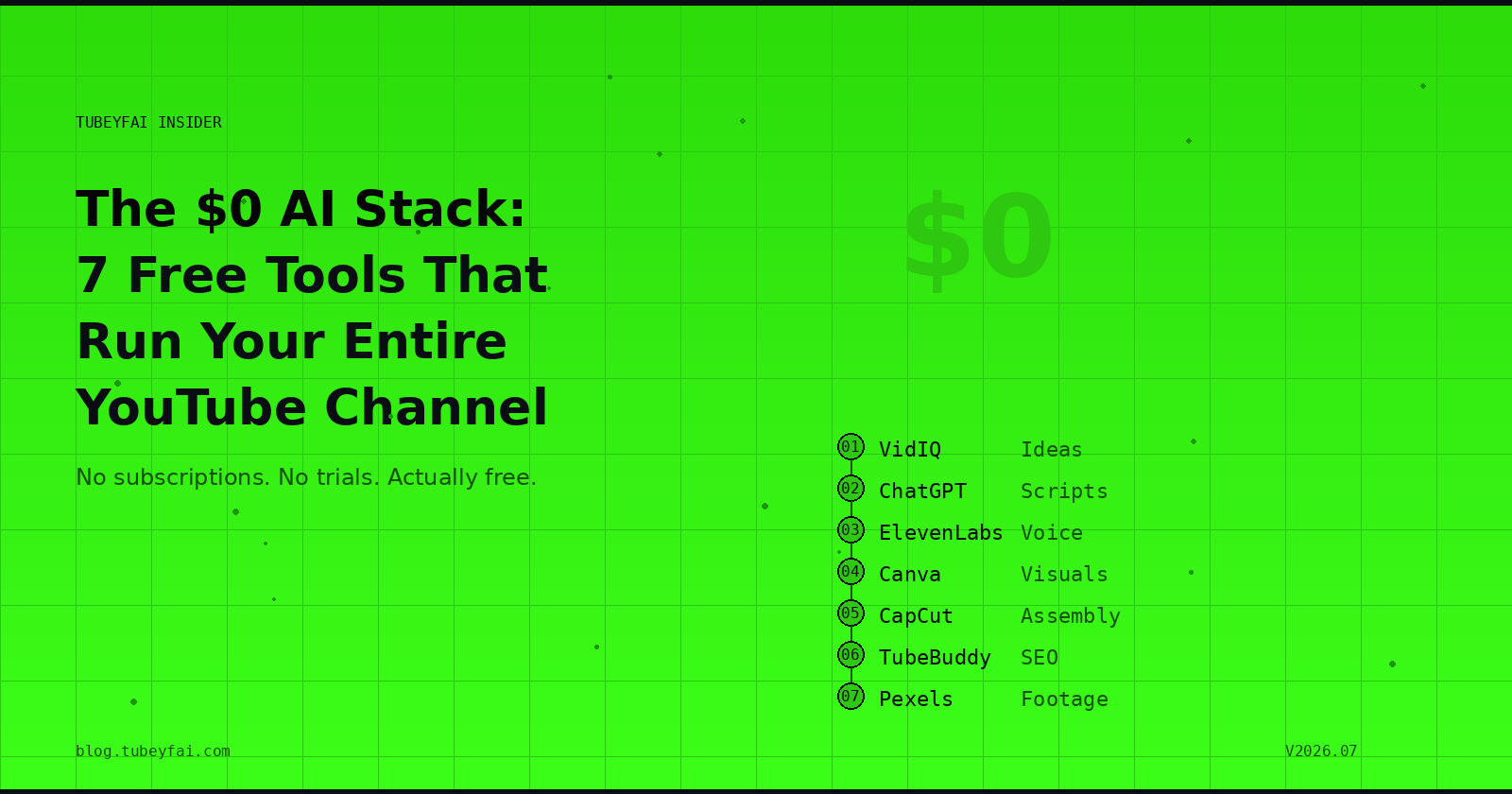
Most YouTube automation courses sell you a tool list that costs $200/month before you've earned a single rupee. That's backwards.
Here's the truth: in 2026, you can build, launch, and monetize a faceless YouTube channel using entirely free tools. Every tool in this stack has a free tier that's genuinely usable — not a 3-day trial, not a "free but watermarked" gimmick, but actually free enough to get your first video published and your channel monetized.
This is the exact stack structure taught inside Tubeyfai, broken down tool by tool, stage by stage.
How the Stack Works (The 6-Stage Pipeline)
A faceless YouTube video moves through six stages from idea to published video. Each stage has one job, and one tool handles it:
Idea → Script → Voiceover → Visuals → Assembly → SEO
That's the whole pipeline. Every tool below maps to one of these stages. No overlap, no redundancy, no "you also need this premium add-on." Six stages, seven tools (one stage gets two options), zero monthly cost.
Stage 1: Idea Research — VidIQ (Free Tier)
What it does: Finds video topics that have high search demand but low competition — the sweet spot where a new channel can actually rank.
Why it matters for faceless channels: You can't rely on personality or a subscriber base to push views on a faceless channel. You need the algorithm to find your video through search. VidIQ shows you exactly what people are searching for, how many videos already cover that topic, and whether you have a realistic chance of ranking.
Free tier gives you:
Daily ideas based on your niche
Keyword scores showing search volume vs. competition
Competitor channel analysis
Trending topic alerts
How to use it: Install the VidIQ Chrome extension. Before scripting any video, search your topic in VidIQ's keyword tool. If the competition score is high and search volume is low — skip it. If competition is low and search volume is decent — that's your next video.
The non-obvious trick: VidIQ's "Outlier" feature shows you videos that performed way above a channel's average. These are proven topics that audiences want more of — ideal for faceless channels to cover from a fresh angle.
Stage 2: Scriptwriting — ChatGPT or Claude (Free Tiers)
What they do: Generate full video scripts from a topic prompt — including hooks, structure, transitions, and calls-to-action.
Why AI scripting works for faceless channels: A talking-head creator can get away with a loose outline because their personality carries the video. Faceless channels live or die on script quality — the words ARE the content. AI lets you generate, test, and refine scripts in minutes instead of hours.
Free tiers give you:
ChatGPT (GPT-4o mini): unlimited messages, strong scripting capability
Claude (free tier): excellent for long-form, well-structured scripts
The right way to prompt for scripts:
Don't just ask "write a script about compound interest." Instead, ask for a structured table with three columns: Voiceover Text, Visual Scene Description, and Estimated Duration. This forces the AI to pre-visualize the video and gives you a production-ready document, not just a wall of text.
Pro tip: Generate 5 different hooks for the same script and pick the one that would make YOU stop scrolling. The hook is worth more production time than the entire middle section of your video.
Stage 3: Voiceover — ElevenLabs (Free Tier)
What it does: Converts your script text into realistic AI voiceover audio that sounds like an actual human narrator, not a robot.
Why this is the game-changer for faceless channels: Two years ago, AI voices were the biggest giveaway that a channel was automated. Viewers heard the robotic tone and clicked away. ElevenLabs changed that completely — its voices are genuinely difficult to distinguish from human recordings at normal listening volume.
Free tier gives you:
10,000 characters per month (~10 minutes of audio)
Access to a library of pre-built voices
Multiple languages and accents
Commercial usage rights on generated audio
10,000 characters per month is enough for 2-3 full YouTube videos. For a new channel publishing weekly, this is more than sufficient to get started and reach monetization before you need to upgrade.
Voice selection tip: Choose a voice that matches your niche's audience expectations. Finance content works with a calm, authoritative male or female voice. Health content works with a warm, empathetic tone. Don't pick the most dramatic voice available — pick the one that sounds like a trustworthy expert in your niche.
Stage 4: Visuals — Canva (Free Tier)
What it does: Creates thumbnails, title cards, lower thirds, transitions, and any static visual assets your video needs.
Why Canva over Photoshop: You're building a faceless YouTube business, not becoming a graphic designer. Canva's templates, drag-and-drop editor, and AI-powered features (background removal, Magic Design, text-to-image) let you produce professional visuals in minutes without any design training.
Free tier gives you:
Thousands of YouTube thumbnail templates
Background remover (limited uses per month)
AI text-to-image generation
Brand kit (save your channel's colors and fonts)
Direct YouTube thumbnail dimensions (1280×720) as a preset
Thumbnail strategy for faceless channels: Since you don't have a recognizable face to put on thumbnails (which is the highest-CTR element for personal-brand channels), you need to compensate with three things: a bold, readable title (max 4 words), a high-contrast color scheme, and one strong visual that creates curiosity. Canva's AI can generate that visual for you.
Stage 5: Video Assembly — CapCut Desktop (Free)
What it does: Assembles your voiceover audio, stock footage, visual assets, and captions into a finished video — with AI-powered editing features that automate the tedious parts.
Why CapCut Desktop (not the mobile version): The desktop version has significantly more AI features, including transcript-based editing (edit video by editing text), AI auto-captions with customizable styling, smart background removal, and auto-beat sync for music. These features are either free or included with very generous limits.
Free tier gives you:
Unlimited exports (no watermark on desktop)
AI auto-captions with custom styling
Transcript-based editing
Stock footage library
Background music library
4K export capability
The faceless channel workflow in CapCut:
Import your ElevenLabs voiceover as the audio track
Add stock footage or screen recordings that match each scene
Use AI auto-captions to generate subtitles (viewers watch with sound off — captions are mandatory)
Add your Canva-designed title card and thumbnail
Export at 1080p or 4K
Upload
Time per video: Once you have the voiceover and visuals ready, assembly in CapCut takes 30-45 minutes for a 10-minute video. With practice, this drops to 20 minutes.
Stage 6: SEO Optimization — TubeBuddy (Free Tier)
What it does: Optimizes your video title, description, and tags so YouTube's algorithm knows exactly who to show your video to.
Why SEO matters more for faceless channels than any other channel type: Personal-brand channels get views from subscribers who recognize the creator's face in their feed. Faceless channels get views from search and suggested videos — both of which are driven by SEO. If your title, description, and tags aren't optimized, YouTube literally doesn't know what your video is about or who to recommend it to.
Free tier gives you:
Tag suggestions based on your topic
Search volume data for keywords
Competitor tag analysis (see what tags top-ranking videos use)
SEO score for your video before publishing
A/B testing for thumbnails
The 5-minute SEO checklist before every upload:
Title includes your primary keyword near the front
Description's first 2 sentences contain your keyword naturally
Tags include your keyword + 3-5 related variations
Thumbnail file is named with your keyword (YouTube reads filenames)
TubeBuddy's SEO score shows green (not yellow or red)
Bonus Tool: Pexels / Pixabay (Free Stock Footage)
What they do: Provide royalty-free stock video footage and images that you can use in any YouTube video without copyright issues.
Why you need this: Faceless channels that use random internet footage get copyright strikes. Channels that use only AI-generated visuals look repetitive and cheap. A mix of high-quality stock footage from Pexels or Pixabay, combined with your Canva graphics and AI visuals, gives your videos a professional, documentary-style feel.
Both are completely free — no attribution required, commercial use allowed, no watermarks.
The Complete $0 Stack Summary
| Stage | Tool | Free Tier Limit | Monthly Cost |
|---|---|---|---|
| Idea Research | VidIQ | Daily ideas + keyword scores | $0 |
| Scripting | ChatGPT / Claude | Unlimited basic messages | $0 |
| Voiceover | ElevenLabs | 10,000 characters (~10 min audio) | $0 |
| Visuals | Canva | Thumbnails + basic design | $0 |
| Assembly | CapCut Desktop | Unlimited exports, no watermark | $0 |
| SEO | TubeBuddy | Tag suggestions + SEO score | $0 |
| Stock Footage | Pexels / Pixabay | Unlimited downloads | $0 |
| Total | $0/month |
This stack is not theoretical. Thousands of faceless channels are running on exactly these tools right now. The tools don't limit you — your consistency and niche selection do.
When (and What) to Upgrade
Stay on the free stack until your channel is monetized. Once AdSense revenue is coming in, upgrade in this order based on ROI:
ElevenLabs ($5-11/mo) — first upgrade, more voiceover minutes means more videos per month
VidIQ ($7.50/mo) — deeper keyword data helps you find higher-CPM topics
CapCut Pro ($8/mo) — AI features like 4K upscaling and advanced editing save hours
Canva Pro ($13/mo) — unlimited background removal, premium templates, Brand Kit
Don't upgrade everything at once. Upgrade the tool that's currently your bottleneck — the one stage where you're spending the most time or hitting limits most often.
The Real Bottleneck Isn't Tools — It's Niche Selection
Every tool in this stack is free. The AI does the heavy lifting. The editing is faster than ever. So why don't more people succeed with faceless channels?
Because they pick the wrong niche. A perfect video in a $2 CPM niche earns less than a mediocre video in a $30 CPM niche. The tools are the easy part. The niche decision is where the real money is made or lost.
If you want to learn how to select high-CPM niches that pay in USD — the kind where $0 tools generate $1,000+ monthly income — that's exactly what we cover inside Tubeyfai's training programs.
This post is part of Tubeyfai Insider — strategies, data, and real student results from a 2,300+ member community building AI-powered YouTube channels for US & Tier-1 audiences.
About the author
- Aviation-Professional-Turned-AI-YouTube-Automation-Coach who's spent 9+ years turning knowledge into income through YouTube, AI Agent Automation, Digital Products, Instagram — YADI without ever showing his Face.
AI Tools
The best free and paid AI tools for building, scaling, and automating faceless YouTube channels — tested, reviewed, and ranked by the Tubeyfai community.